|
How to track your emails
ReadVerify optional email plugins give you easy and instant access to all ReadVerify email tracking, certification and other email features right from your desktop.
A new 'universal' automated tracking application will be available soon, for now please use plugins or manual tracking methods described below.
Choose an email plugin / email tracking method which is right for you.
ActiveTracker General Purpose Plugin v3.2
For use with:
- Operating systems: XP or Windows 2003
- Outlook 2003 or 2007 (not exchange)
- Thunderbird, Eudora, Incredimail, Pegasus, Mozilla, Opera
What it looks like:
Once installed, you will find your ActiveTracker
console located in your system tray (near your clock) This is where you can turn the
tracking on and off and choose different sending options
For more detailed instructions on how to use your ActiveTracker plugin (including
uninstalling), please access our Help
Page which is also available from your console.
To download this plugin, close all other programs then click here (1mb):
rngen32.exe
ActiveTracker Outlook Vista plugin
For use with:
- Vista operating system.
- Microsoft Outlook 2003 or 2007 or MS Exchange email program (not 2010).
This is a beta version of our Outlook component for XP/Vista.
Download here (4.5mb): rn-outlookonly-setup-v4.exe
|
Note: If you receive a 'requires elevation' error from Vista; right click on the Vista 'WinZip' icon and 'run as administrator'. Then try the install again.
|
|
General Purpose Plugin v4.0-beta
(enhanced)
For use with:
- Operating systems: XP or Windows 2003
- MS Exchange Server (note; you may be required to have 'administrator
privileges' in order to install plugins on your systems)
- If our current version 3.2 did not work for you, and you have been advised by our
technicians to try version 4.0 instead.
What it looks like:
Once installed, you will find your ActiveTracker
console located in your system tray (near your clock) This is where you can turn the
tracking on and off and choose different sending options
For more detailed instructions on how to use your ActiveTracker plugin (including
uninstalling), please access our Help
Page which is also available from your console.
To download this plugin, close all other programs then click here (1.5mb):
rngen40.exe
|
General Tracking
|
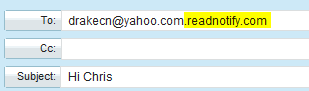
You can send tracked email from any computer, on any operating system by simply typing .readverify.com on the end of your recipients email address (they won’t see this). Eg;
Here’s an example of a tracked email to drakecn@yahoo.com:
Tips and information:
Adding .readverify.com uses the tracking based on your sending defaults.
You can use other sending options also if you want to (eg; certified / ensured etc) - see our FAQ: Other sending options regarding this.
If you send a group email, remember that you need to add tracking to ALL recipients, not just some of them.
If you are having trouble adding .readverify.com to your recipients email address, it’s probably because your email client is trying to auto-complete the address for you (eg; trying to copy it from your address book). You can override this by continuing to type in the address over top of the one which was completed for you.
If you regularly send your tracked emails to the same people, and don’t want to type .readverify.com every time, a good way to simplify this is add these people to your address book with the extension already on their email address. That way it’s there when you want it (remember to remove it if you don’t want to track to them).
New plugins are coming!
Note: the plugins we offer are optional – you do not require them to send tracked emails. See general tracking above.
We are currently working on plugins for the following:
- Updates to Outlook / Vista plugin
- Windows 7
- Outlook 2010
- Outlook Express (Windows Live)
- Hotmail (Livemail)
- The new Yahoo (classic and beta)
- Gmail
We will send a newsletter when these new plugins are available.
Future plugin plans are intended for the following:
- Vista operating system with other email clients (Thunderbird etc)
- Macs
- Linux / Unix / BSD
|
|
|
More about ReadVerify ActiveTracker Desktop Email Plugins
Our optional email plugins give you easy and instant access to all of the ReadVerify tracking, certification, and other email features right from your desktop
These features include:
- Email Tracking Depending on how you send your messages (and how your recipients read them) your ReadNotifications will include the following: When your emails are read; How long they are read for;   Whether or not your recipient clicked on any links you sent them;   The location of your reader;
Whether they were forwarded ... and much more.
- Reliable Delivery Emails sent using our service utilize ReadNotify's new anti anti-spam technology and are transmitted via our SPF compliant servers. Not only will you receive ReadNotifications when your messages are read, but you can also choose to receive Delivery Service Notifications when your messages are initially delivered. Our service also ensures you are notified regarding any message you send which results in a 'bounce-back'.
- Group Tracking Track your messages to multiple recipients with just one click.
- Automatic PDF tracking Track your PDF attachments as well as the email.
- Certified Receive proof-of-sending and proof-of-opening digitally signed and time-stamped court-admissible receipts
- Self Destructing Email Set your messages to expire after a specified time. This feature also blocks: print, copy, save, forward and print-screen. Messages sent this way can also be retracted.
- Ensured-Receipts Guarantee a ReadNotification for any message you send; even to recipients who read their emails offline. Messages sent this way can also be retracted
- Language Translation Have your emails translated into the language of your choice with just one click.
- Detailed Notifications Choose to receive your ReadNotifications via email and optionally by SMS, Pager, ICQ, IRC, MSN/AOL/AIM/Yahoo Messenger and on your own "Personal Tracking Page" from our site
Note: In order to avoid conflicts, please only install one plugin.
|
|